
What Recruiters Look For: Systems Administrator Resumes by Career Level
Hiring expectations shift significantly depending on your years of experience. Tailor your resume highlights to align directly with the seniority tier you are targeting:
Recruiters prioritize clean coding fundamentals, data structures, Git versioning, and demonstrated enthusiasm to learn modern frameworks.
- Lead with: Degree / CS coursework, active GitHub repositories, and capstone full-stack projects.
- Key proof: Functional API integrations, automated test suites, and clean documentation in pull requests.
- Red flag to avoid: Claiming to be an "expert" in 15 languages without demonstrable codebase history.
Recruiters seek independent feature ownership, database optimization, cloud deployments, and dependable agile delivery.
- Lead with: Quantified performance optimizations (latency reduction, API throughput, query tuning).
- Key proof: Production releases, microservices architecture, AWS/GCP infrastructure, and CI/CD pipelines.
- Red flag to avoid: Passive bullet points like "wrote code and fixed bugs" without citing technical scale or metrics.
Focus shifts from individual code output to high-level architecture decisions, mentoring engineers, and aligning tech with business KPIs.
- Lead with: Executive summary highlighting system scale, architectural strategy, and team mentorship.
- Key proof: High-availability distributed architectures (99.99% SLA), 25%+ cloud cost savings, and tech roadmaps.
- Red flag to avoid: Focusing strictly on low-level syntax while ignoring business ROI, team leadership, and cross-team influence.
How to Write an Interview-Winning Systems Administrator Resume
Recruiters for systems administrator roles look for technical competence, proven delivery, and clean accountability. The most effective resumes balance technical proficiency with measurable operational outcomes:
1. The Professional Summary: Your 30-Second Pitch
Your summary should highlight your years of experience, core industry domain, and primary technical strengths.
2. Writing Realistic, Credible Bullet Points
Avoid writing passive duties like "Responsible for daily operations" or exaggerated claims. Focus on genuine scope and process ownership:
- Instead of: "Worked on daily projects and tasks."
Write: "Administered enterprise hybrid infrastructure of 280+ Windows and Red Hat Linux servers, maintaining 99.98% uptime for 2,400 corporate users." - Instead of: "Helped improve team procedures."
Write: "Engineered automated PowerShell and Ansible provisioning playbooks, slashing new server configuration deployment from 6 hours to 20 minutes." - Instead of: "Communicated with clients and partners."
Write: "Architected enterprise backup and disaster recovery strategy utilizing Veeam and AWS S3 Glacier, cutting Recovery Time Objective (RTO) by 65%."
Copy-Paste Ready Resume Content
Click "Copy Text" to grab these pre-formatted sections and paste them into our AI Resume Builder or your own word processor:
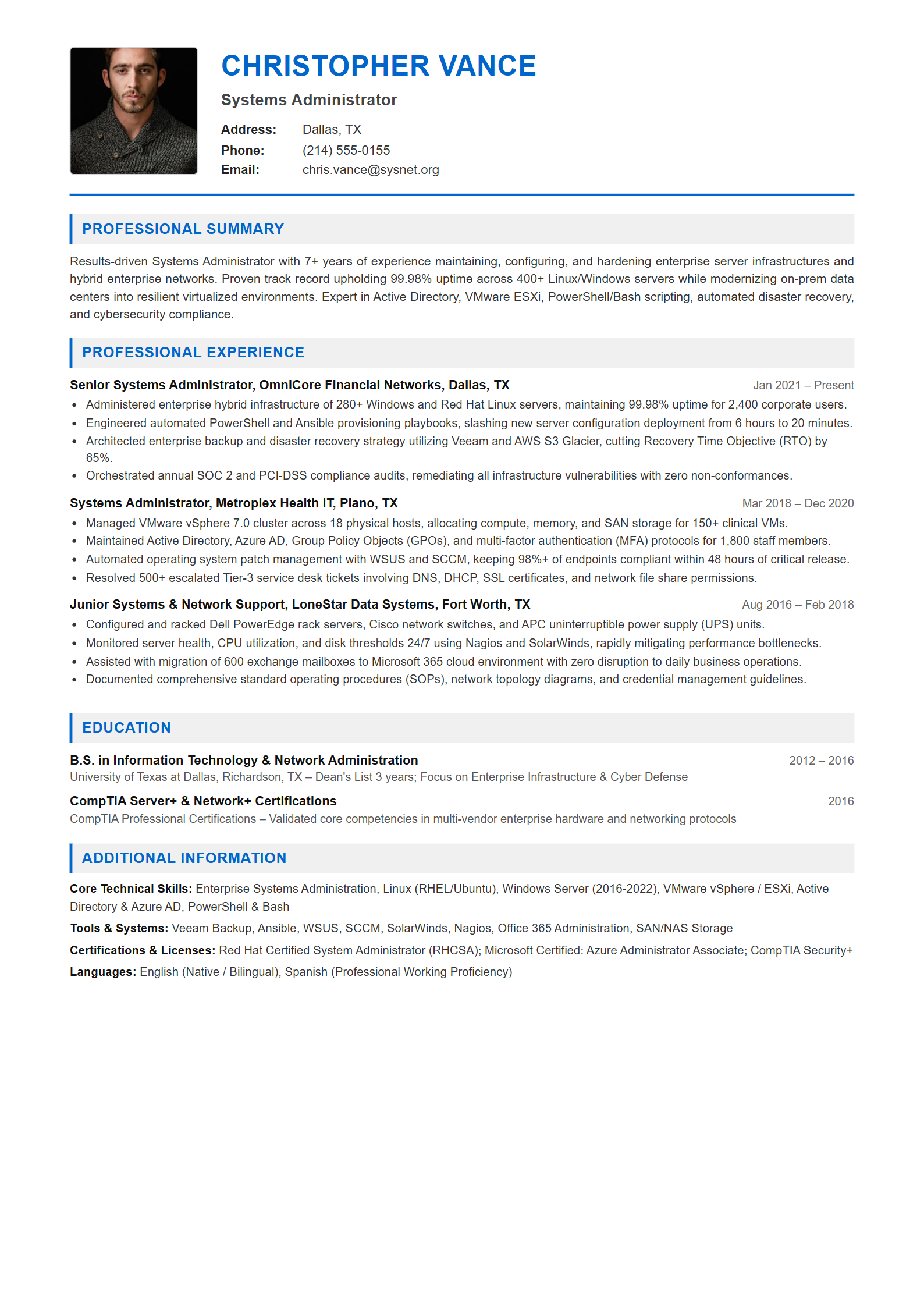
CHRISTOPHER VANCE
Systems Administrator
Address: Dallas, TX
Phone: (214) 555-0155
Email: chris.vance@sysnet.org

PROFESSIONAL SUMMARY
Results-driven Systems Administrator with 7+ years of experience maintaining, configuring, and hardening enterprise server infrastructures and hybrid enterprise networks. Proven track record upholding 99.98% uptime across 400+ Linux/Windows servers while modernizing on-prem data centers into resilient virtualized environments. Expert in Active Directory, VMware ESXi, PowerShell/Bash scripting, automated disaster recovery, and cybersecurity compliance.
Senior Systems Administrator | OmniCore Financial Networks, Dallas, TX
Jan 2021 – Present
• Administered enterprise hybrid infrastructure of 280+ Windows and Red Hat Linux servers, maintaining 99.98% uptime for 2,400 corporate users.
• Engineered automated PowerShell and Ansible provisioning playbooks, slashing new server configuration deployment from 6 hours to 20 minutes.
• Architected enterprise backup and disaster recovery strategy utilizing Veeam and AWS S3 Glacier, cutting Recovery Time Objective (RTO) by 65%.
• Orchestrated annual SOC 2 and PCI-DSS compliance audits, remediating all infrastructure vulnerabilities with zero non-conformances.

Systems Administrator | Metroplex Health IT, Plano, TX
Mar 2018 – Dec 2020
• Managed VMware vSphere 7.0 cluster across 18 physical hosts, allocating compute, memory, and SAN storage for 150+ clinical VMs.
• Maintained Active Directory, Azure AD, Group Policy Objects (GPOs), and multi-factor authentication (MFA) protocols for 1,800 staff members.
• Automated operating system patch management with WSUS and SCCM, keeping 98%+ of endpoints compliant within 48 hours of critical release.
• Resolved 500+ escalated Tier-3 service desk tickets involving DNS, DHCP, SSL certificates, and network file share permissions.

Junior Systems & Network Support | LoneStar Data Systems, Fort Worth, TX
Aug 2016 – Feb 2018
• Configured and racked Dell PowerEdge rack servers, Cisco network switches, and APC uninterruptible power supply (UPS) units.
• Monitored server health, CPU utilization, and disk thresholds 24/7 using Nagios and SolarWinds, rapidly mitigating performance bottlenecks.
• Assisted with migration of 600 exchange mailboxes to Microsoft 365 cloud environment with zero disruption to daily business operations.
• Documented comprehensive standard operating procedures (SOPs), network topology diagrams, and credential management guidelines.
B.S. in Information Technology & Network Administration
University of Texas at Dallas, Richardson, TX | 2012 – 2016
University of Texas at Dallas, Richardson, TX – Dean's List 3 years; Focus on Enterprise Infrastructure & Cyber Defense

CompTIA Server+ & Network+ Certifications
CompTIA Professional Certifications | 2016
CompTIA Professional Certifications – Validated core competencies in multi-vendor enterprise hardware and networking protocols
Core Competencies: Enterprise Systems Administration, Linux (RHEL/Ubuntu), Windows Server (2016-2022), VMware vSphere / ESXi, Active Directory & Azure AD, PowerShell & Bash
Tools & Systems: Veeam Backup, Ansible, WSUS, SCCM, SolarWinds, Nagios, Office 365 Administration, SAN/NAS Storage
Certifications & Licenses: Red Hat Certified System Administrator (RHCSA); Microsoft Certified: Azure Administrator Associate; CompTIA Security+
Languages: English (Native / Bilingual), Spanish (Professional Working Proficiency)
Essential Systems Administrator Keywords for 2026
Ensure your resume includes these core technical competencies and software systems to match recruiter search queries: